
To nail your video length, you need to understand the mindset of LinkedIn users. Unlike on YouTube, where people actively search for tutorials, or on Instagram, where they are looking to be entertained, LinkedIn users are usually:
This explains why short, concise videos often outperform longer ones. People want to learn quickly and move on.
But here’s the nuance: if your audience perceives your video as relevant and helpful, they will stick around for longer. This is where storytelling and pacing matter more than raw length.
Let’s break down the ideal lengths based on what you want to achieve:
Best length: 30–60 seconds
These are your “hook” videos, snappy, engaging, and designed to stop the scroll. Think of teasers, animated explainers, or short clips that introduce your company in a nutshell.
Example: A SaaS startup launching a new feature could use a 45-second animated explainer to spark curiosity.
Best length: 60–90 seconds
Explainers simplify complex ideas into digestible stories. On LinkedIn, they perform best when they’re short, clear, and visually engaging. Anything beyond two minutes risks overwhelming the professional audience unless it’s highly technical.
Pro tip: Use captions. 80% of LinkedIn videos are watched without sound.
Best length: 2–3 minutes
If you’re positioning your brand or a founder as an industry voice, you have permission to go longer, but only if the content is actionable.
Example: A CEO sharing predictions for the future of fintech in a crisp 2.5-minute video.
Best length: 90 seconds–2 minutes
Prospects want proof, but not a novel. Keep customer stories focused on the problem, the solution, and the result. Short, authentic clips build more trust than overproduced, drawn-out videos.
Best length: 15–30 seconds
With paid campaigns, every second costs you money. Keep it punchy. Use the first 5 seconds to highlight the problem and hint at the solution.
LinkedIn Video Size Ratio
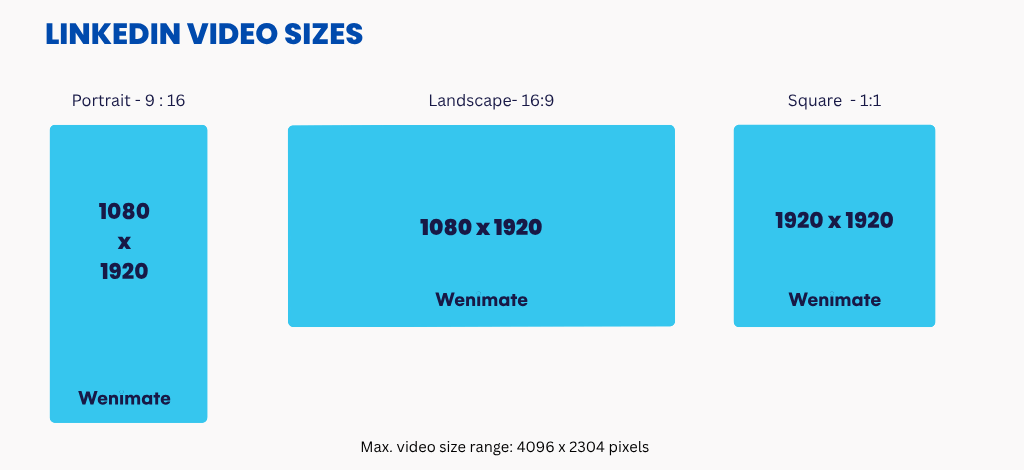
When uploading videos to LinkedIn, choosing the right video size ratio is crucial for ensuring your content looks professional and is easy to consume. LinkedIn supports multiple aspect ratios, including 16:9 (landscape), 1:1 (square), and 9:16 (vertical).
For most types of content, especially explainer videos and motion graphics, the 16:9 aspect ratio is the ideal choice. It works seamlessly across both desktop and mobile views, offering a balanced visual experience for all users. It is also the best format for video ads, crowdfunding videos, and other long-form content.
However, as video consumption increasingly shifts to mobile devices, square (1:1) and vertical (9:16) formats are gaining popularity. Square videos are often more engaging on mobile because they fill more of the screen, increasing the chances of capturing the viewer’s attention. Vertical videos are also ideal for mobile-first viewing, especially for career videos or other quick, impactful content.
Even great brands often stumble when it comes to video length. Here are the most common pitfalls we see:
While the benchmarks above are a great starting point, here’s how you can identify the perfect video length for your brand:
One of our B2B clients came to us with a 4-minute product demo they wanted to post on LinkedIn. While the demo was detailed, we knew it was too long for the platform.
Here’s what we did:
The result: The 90-second explainer outperformed expectations, boosting engagement by 42% compared to their previous long-form content.
The lesson: on LinkedIn, brevity paired with clarity wins.
If we had to give a single answer, 30–90 seconds is the sweet spot for most LinkedIn videos. But don’t treat this as a rigid rule. Instead, think of length as a lever you can adjust based on:
At the end of the day, content quality > content length. A sharp 45-second video that hooks, educates, and leaves viewers wanting more will always outperform a bloated 3-minute one.
LinkedIn video isn’t about chasing trends; it’s about creating professional, valuable, and concise content that resonates with your audience.
As an explainer video production agency, we’ve seen time and again that the right length can turn a simple video into a powerful growth tool. Whether you’re building awareness, generating leads, or showcasing expertise, the key is to respect your viewers’ time while delivering maximum value.
Contact Wenimate today to create LinkedIn videos that hit the perfect balance, short enough to engage, long enough to matter.